
Getting Started
Deathwish is a necromancy spell system for Second Life. It gives you the dark powers of necromancy and sorcery: conjure the dead, draw ancient sigils, cast hexes and more.
What Deathwish can do
Necromantic spells
Raise zombies, fire bone needles, trap enemies in tombs and cages, and travel through graves. Open the Spell Library.
Sigils
Draw hidden traps on floors, walls and ceilings. They wake up when someone steps on them. About sigils.
The Necrobane Scepter
The heart of Deathwish. Click it to open the spell menu. Its glow color is yours to choose.
Three ways to cast
Click the scepter, click the HUD, or type a command in chat. Commands also work in gestures.
Cleans up after itself
Your spells end on their own when you leave the region, log out, or after a short time.
What you get
- The Necrobane – the scepter you wear. Deathwish works through it.
- The Deathwish HUD – a small button panel on your screen.
- A dispel gesture – ends all of your magic with one key press.
New to Second Life?
Second Life Basics explains unpacking, wearing a HUD and typing commands, step by step.
The Necrobane Scepter

The Necrobane is the main part of Deathwish. Think of it as your wand.
Wear the scepter
You must wear the Necrobane to cast any spell. The HUD and the chat commands only send orders to the scepter. Without it, nothing happens.
- Click the scepter to open the spell menu and the target menu.
- The scepter glows with magic from time to time.
- Click and hold the scepter for more than 5 seconds to check for updates.
Change the glow color
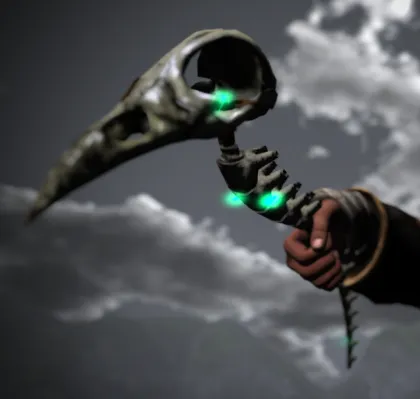
Type this in chat, with the color you want:
/7 dwcolor red/7 dwcolor purple/7 dwcolor greenYou can choose: red, green, blue, orange, yellow, pink, white, purple or black.
Channel 7, not 8
This is the only Deathwish command on channel /7. All other commands use channel /8.
The HUD
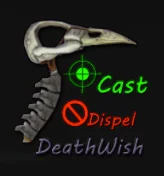
The HUD is a small panel with two buttons:
- Cast – click it to cast a spell.
- Dispel – ends your active magic.
The HUD is only a remote control. It talks to the scepter, so you still need to wear the Necrobane.
Cast a spell
With a click
- Click the Necrobane, or click Cast on the HUD.
- Choose a spell from the menu.
- Choose a target: an avatar near you, or CAMERA.
At your camera
Choose CAMERA as the target and the spell goes where your camera is looking. Hold Alt and click a spot to aim your camera there first. How to move your camera.
By chat command
Type the spell, then a target, then a variant if the spell has one. Commands use channel /8.
/8 reject torley/8 teleport torley shadow/8 reject/8 reject torleycasts Reject on an avatar named Torley./8 teleport torley shadowteleports you to Torley with the Shadow effect./8 rejectwith no target opens the target menu.
Short names work. /8 rej tor casts Reject on an avatar whose name starts with "tor".
The Chat Commands page lists everything you can type.
End your spells
- Click Dispel on the HUD, or
- Type
/8 dispel, or - Use the dispel gesture: press Ctrl + D, or type
/dispel.
Dispel removes all of your active spells in the region, and cleans up every object they left behind.
Spells also end by themselves when:
- you leave the region,
- you log out,
- 60 seconds have passed. (A few special spells last up to 5 minutes.)
Secrets of the Necrobane
Deathwish hides some of its best tricks. Here are the ones most people miss.
The needle shockwave
Aim all of your Necro Needles at one single point. They join in a super explosion. Its shockwave cancels all Deathwish magic in the blast, including sigils. Read more.
Steer your needles
In mouselook, turn your camera while the needles fly. They follow your aim.
Stack sigils
Draw two sigils in the same place. Absorb pulls people in, then Ignis throws them out. Sigil combos.
Resize a sigil
Click and drag on a sigil to make it bigger or smaller, even while it is active.
Secret doors
A Subduct sigil on a wall pulls people through to the other side. On a floor, it pulls them under.
Dispel just one spell
Add a spell name to dispel, such as /8 dispel confine, to end only that spell. Commands.
What next?
Spell Library
Every spell, what it does and how to control it. Open the Spell Library.
Sigils
Six sigils, how to resize them and how to combine them. Learn sigils.
Help & FAQ
Solutions to common problems. Get help.