
Orbing
Orbing is the witch's way to travel: you vanish in a shower of light and appear somewhere else. In the Book of Shadows, orbing is a complete teleport system of its own, with its own page on the HUD. Every button comes with rich visual effects.
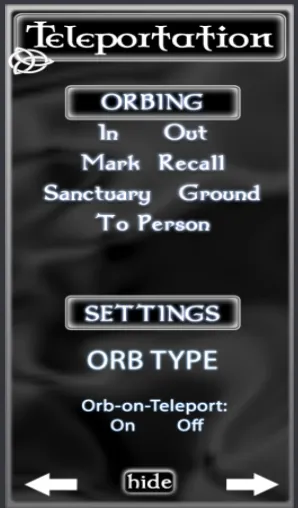
The Orbing buttons
In
Orb in. You become visible.
Out
Orb out. You become invisible.
Mark
Remember the place where you stand. You give it a name, and it is added to your Recall menu. See Mark a place.
Recall
Orb back to any place you have marked, from anywhere on the grid. If the place is in another region, the world map opens. Click Teleport on the map to go there.
To Person
Orb to any avatar in the same region. Choose them from the menu. You arrive right beside them.
Ground
Orb down to the ground. Use it for a quick escape.
Sanctuary
Summons a divine platform high above the region, and offers to orb you "up there" to the heavens. On the platform is the Elder Map. If your platform is already there, Sanctuary orbs you straight to it. See Sanctuary and the Elder Map.
Mark a place
Marks are your own magic bookmarks. They work across the whole grid.
- Go to the place you want to remember.
- Click Mark. A menu of slots opens.
- Choose an empty slot, such as Slot 1. You have 10 seconds.
- Type a name for the place in local chat, for example
Home. You have 60 seconds.
If you do not type a name, the slot is named after the position. Names can have up to 24 characters. The menu shows the first 14.
To go back later, click Recall and choose the name.
Sanctuary and the Elder Map
The Elder Map is a large magic map. It uses scrying magic to show the whole region and every avatar in it.
- Click anywhere on the map to orb to that spot in the region.
- Click an avatar's icon on the map to orb right beside that avatar.
Watch over the region
From Sanctuary you can see everyone in the region at once. Click an icon, and you are at their side.
Settings
Below the Orbing buttons, the Teleportation page has a Settings area.
- Orb Type: switch your orb effects between Whitelighter (the default) and Darklighter. Local chat confirms the new mode, for example
Orbing Mode: Darklighter. - Orb-on-Teleport: On / Off: when it is On (the default), you arrive in a shower of orbs after every teleport. Choose Off to arrive normally.
Chat commands
You can also orb from local chat on channel /3. Only you, the owner, can use it.
/3 orb in/3 orb out/3 orb mark/3 orb recall/3 orb to/3 orb ground/3 orb sky/3 orb toopens the avatar menu. Add part of a name to orb to that avatar directly, for example/3 orb to torley./3 orb skyis the same as Sanctuary./3 orb simfollowed by a region name opens the world map at that region, for example/3 orb sim Arcanum.
The Orb Type and Orb-on-Teleport settings also have commands: /3 mode_light, /3 mode_dark, /3 tpfx_on and /3 tpfx_off.